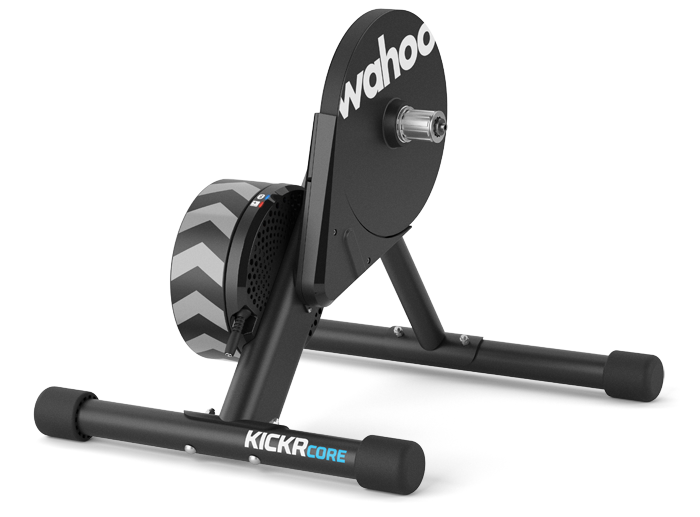
The Wahoo KICKR CORE Smart Trainer delivers a realistic, accurate, and quiet training experience using the same proven flywheel technology and advanced algorithms pioneered by Wahoo's original legendary trainers. Durable enough to withstand the most intense training with more software options, KICKR CORE is the foundation of data-driven training.
Download the Wahoo App
|
The Wahoo app keeps your trainer up to date and leverages your smartphone to record basic workout information, delivering data-driven power that fuels your training and fitness goals. Get the app now to register your KICKR CORE. |
Specifications
- Part Number: WFBKTR4
- Dimensions (legs open): 20"L x 23"W x 19"H (51 cm x 59 cm x 49 cm)
- Dimensions (legs closed): 9"L x 23"W x 21"H (22 cm x 59 cm x 54 cm)
- Weight (Unboxed): 40 lbs (18.1 kg)
- Rear Wheel Size: 24" RD / 24" MTB / 650c RD / 26" MTB / 700c RD / 650b MTB / 29" MTB
- Hub Types: 130/135mm QR, 12x142/148 Thru Axle - Adapters Included
- Drivetrain: Various - without cassette, with 8-12 speed Shimano-compatible cassette, or Zwift Cog + Click
- KICKR CLIMB Compatible: Yes
- KICKR HEADWIND Compatible: Yes
- Front Wheel Block: Sold Separately
- Resistance Type: Electromagnetic
- Accuracy: + / - 2%
- Connectivity: Bluetooth*®, ANT+, ANT+ FE-C
*Zwift Click requires Bluetooth connection. - Wireless Software Updates: Yes
- 3rd Party Power Meter Support: Yes
- Devices: iOS, Android, PC (Mac and Windows)
- Max User Weight: 250 lbs (113 kg)
- Power Source Requirements: 100-240V~1.5A 50-60 Hz
- Flywheel Weight: 12 lbs (5.5kg)
- Maximum Simulated Grade: 16%
- Maximum Power Output: 1800 Watts
Compatibility
User
Max User Weight: 250 lbs (113 kg)
Bicycle Frame
See Bicycle Frame Compatibility for CORE for bicycle frame compatibility.
Bicycle Drivetrain
See Drivetrain Compatibility for KICKR, CORE, and MOVE trainers for bicycle drivetrain compatibility.
Device/App
- Drivetrain Compatibility for KICKR, CORE, and MOVE trainers
- Bicycle Frame Compatibility for CORE
- Device Compatibility for CORE
Features
- Trainer control modes for CORE with the Wahoo app
- Trainer control modes for CORE with ELEMNT, BOLT, or ROAM
- Using Your KICKR CORE and Power Meter With the iOS Wahoo Fitness App
- How do I Pair a KICKR to an ELEMNT?
- How to Control KICKR CORE with an ELEMNT
- Spindown calibration on CORE using an ELEMNT, BOLT, or ROAM
- Using CORE with an Apple TV
In The Box
- KICKR CORE Smart Trainer
- Rear Leg Assembly (shorter leg)
- Front Leg Assembly (longer leg)
- Leg assembly nuts (x4)
- Leg assembly bolts (x4)
- Hex wrench tool
- 1.8mm axle spacer (for use with 8-10 speed cassettes)
- Adapter A - drive side adapter for 130/135mm Quick Release (QR)
- Adapter B - non-drive side reversible hub spacer for 130/135mm QR
- Adapter C - drive side for 12x142/148mm Thru Axle
- Adapter D - non-drive side for 12x142mm Thru Axle
- Adapter E - non-drive side for 12x148mm Thru Axle
- AC power adapter (LTE60E-S2-1)*
- Caution: Use of third party power adapters not supplied by Wahoo Fitness may cause permanent damage to your trainer.
- Quick release skewer
Setup
Download the full Wahoo KICKR CORE Quick Start Guide as a PDF for instructions in English and other languages or see Set up your KICKR CORE Smart Trainer for full details.
Zwift Support Resources for setting up and using the CORE Zwift One with Zwift:
Care and Maintenance
The KICKR CORE requires minimal cleaning and maintenance if dirt or grime collects. If cleaning is needed, clear any debris and use a moist, soft cloth to wipe surfaces, avoiding dripping moisture into any part of the CORE itself. Also avoid using strong cleaning agents as these may damage or reduce the lifespan of your CORE.
Frequently Asked Questions
- What do the CORE LEDs mean?
- Why choose CORE with Zwift Cog vs cassette?
- KICKR CORE Zwift One FAQ
- Zwift Ride with KICKR CORE FAQ
- How to Pack KICKR CORE for Return
Troubleshooting
-
CORE Troubleshooting Guide
- My bike does not fit on the CORE.
- CORE noise or vibration
- The CORE is not level
- The CORE is completely unresponsive
- Cannot connect CORE to app or device
- The CORE is connected, but there is no speed, cadence, or power data
- The CORE is connected, but there is no power/cadence data and intermittent speed will not exceed 12mph
- CORE power spikes or dropouts.
- The CORE is stuck or locking up.
- CORE power data does not match another power meter or seem right.
- Cannot update CORE firmware
- Spindown Calibration Troubleshooting for CORE
- Serial number location for KICKR, MOVE, CORE, or SNAP
- Creating a Video of a Trainer for Submission to Wahoo Support
- How to Pack KICKR CORE for Return