KICKR BIKEs (PRO / 1 / 2) and BIKE SHIFT support a variety of controls in the Zwift game, varying by model. See functionality as listed by model below
Requirements:
- A KICKR BIKE / BIKE SHIFT on the latest firmware
- The latest version of the Zwift app
- Any gear selection other than Campagnolo (which overrides hood button use for shifting)
- Connection to Zwift on any platform over Bluetooth®* or Wi-Fi / Direct Connect when available.
*Controls are not available over ANT+ connections.
Steering must be enabled when connecting, and must be supported by your race (though it is enabled, by default, in free ride). Additionally, steering is not available in Repack Ridge.
For more details on steering in Zwift, see Zwift's article Steering with a KICKR BIKE.
KICKR BIKE PRO
Steering
- Use the interior hood buttons. (not available when using a Campagnolo shifter configuration.)
Braking
- Use the front and rear brake.
App navigation + other in-ride controls
BIKE PRO offers a 4 button controller-style interface on top of each hood:
Left hood
-
LEFT
- Navigate left (menu/action bar) or
- Cycle the mini map (in ride)or
- Go left at an intersection (in ride)
-
UP
- Navigate up (menu/action bar) or
- Display or hide the action bar or
- Go straight at an intersection (in ride)
-
RIGHT
- Navigate right (menu/action bar) or
- Go right at an intersection (in ride)
-
DOWN
- Navigate down (menu/action bar) or
- Display the look-back camera (in a Zwift Event)
Right hood
- A - Select
- B - Back or Display Menu when in a ride or workout
- Y - Use a power up (in ride) or Skip an interval (in a workout)
- Z - Return a Ride On (in ride) or hold to give a Ride On to 5 riders in your vicinity
See Using Your Zwift Ride Controller for the current full range of controls set by Zwift.
BIKE v2 / v1 and SHIFT
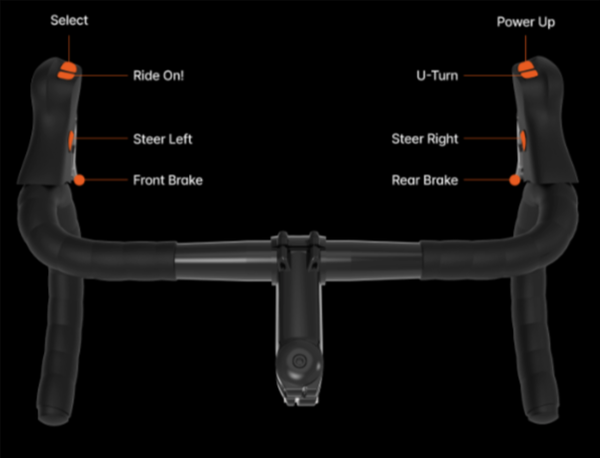
KICKR BIKE 2
Steering
- Use the interior hood buttons. (not available when using a Campagnolo shifter configuration.)
Braking
- Use the front and rear brake.
Select
- Use the front button on top of the left shifter
Ride On!
- Use the rear button on top of the left shifter
Power Up
- Use the front button on top of the right shifter
U-turn
- Use the rear button on top of the right shifter
KICKR BIKE SHIFT
Steering
- Use the interior hood buttons. (not available when using a Campagnolo shifter configuration.)
Braking
-
- Use the front and rear brake.
Select
- Use the front button on top of the left shifter
Ride On!
- Use the rear button on top of the left shifter
Power Up
- Use the front button on top of the right shifter
U-turn
- Use the rear button on top of the right shifter
KICKR BIKE 1
Steering
- Use the interior hood buttons. (not available when using a Campagnolo shifter configuration.)
Power Up
- Use the front button on top of the right shifter
U-turn
- Use the rear button on top of the right shifter
Braking, Select, and Ride On!
-
are not, and will not be available for BIKE v1 in the future.
- We have reviewed the hardware and firmware capabilities of KICKR BIKE v1 (2019). Unfortunately, this older model is unable to support the required protocol for expanded Zwift controls and will not be receiving a future update for this functionality.